Taking back control:
Introducing repo-sync
Wait, which version did we run?
If you manage an automated instrument that gets updated from time to time, you've probably been asked something like this before. A plate comes off the deck looking not-quite-right, and among the many questions that get raised about what happened, you are asked whether the robot ran the version of the method you were expecting. Without the right setup, answering that means an afternoon of digging through logs and instrument files instead of working on new projects.
I've been running automation platforms for about ten years, most recently building one up from an empty lab to a fleet of liquid handlers. At almost every lab I've worked in, the same problem came up and needed the same kind of fix. After seeing it one too many times, I decided to build a proper version on my own and share it. It's called repo-sync, and it's free and open source under the Apache 2.0 license. The full technical details live in the docs on GitHub. This post is about why it exists and what it's like to use.
Drifting apart
On most systems a method is just a folder of files on the computer attached to the instrument. Every update is a chance for that folder to end up different from what you meant to be running. Someone's quick test of a new parameter accidentally becomes a permanent feature. A fix gets made on the instrument PC and never makes it back to the master copy, so the next update quietly undoes it. An instrument in the middle of a study gets kept on the old version, and by the time the study wraps up nobody remembers it was held back. Add a second or third robot running the same method and it gets worse, because a fix copied to one instrument can easily miss another.
Sometimes it's carelessness, but far more often it's busy people doing reasonable things in a system that makes it too easy to make mistakes. When the only record of what's on a robot is the files sitting on it, things drift.
And drift gets expensive. A run on the wrong version can cost a plate of samples, a week of reagents, or an investigation that pulls your best people off their real work. If you work under a quality system, "we think so" isn't an answer anyone wants to give.
Many labs are catching on to a tool most "traditional" software developers have used for years: git.
It's a fantastic tool on its own, and it puts your lab miles ahead of folks still naming their methods
PCR_V2_final_FINAL. You get a history of every change and a clear way to mark a release.
What git can't do alone is guarantee that each robot is actually running the release you think it is. Somebody still has to go to each PC and update it, ideally without typing git commands on a robot in the middle of a shift. And operators still wonder whether they really ran the process the engineer intended.
Those last few hurdles are why I built repo-sync.
What repo-sync does
Everything starts from a manifest, which is just a CSV that says which version of each method belongs on which robot:
| Repo | URL | Directory | Tag | Critical | Device1 | Device2 |
|---|---|---|---|---|---|---|
| Shared-Library | git@github.com: | C:\Repos\Shared-Library | v1.2 | TRUE | All | |
| Method-A | git@github.com: | C:\Methods\Method-A | v3.1 | DEVICE_B | DEVICE_C |
Each row is a repo, where it lives on disk, the git tag it should be on, and which robots get it. Here the shared library goes on every robot, and Method-A only goes on robots B and C.
From there it's two commands. sync brings a robot in line with the manifest: it clones
anything missing and checks every repo out at its tag. check just looks. It reports each
repo as OK, DIRTY (right version, but someone edited files),
OUT OF DATE, or NOT A REPO, and changes nothing.
py sync.py sync main DEVICE_B
py sync.py check main DEVICE_B --output C:/results/check.csv$ python sync.py check main DEVICE_B --output /lab/check.csv INFO Command: check INFO Manifest branch: main INFO Device: DEVICE_B INFO Manifest: /lab/repo-sync/manifest/manifest.csv INFO Checking out the local copy of branch 'main' without pulling it... INFO Manifest commit: 7516ab863d3167080d001cde8d84afff165049de INFO 4 repos for device DEVICE_B INFO Checking 4 repos... INFO OK Shared-Library: expected v3, found v3 WARNING DIRTY PCR-Setup: expected v2.2, found v2.2-dirty WARNING OUT OF DATE NGS-Normalization: expected v2.1.1, found v2.1 INFO OK Plate-Reader-Export: expected v2.1, found v2.1 INFO Writing results to /lab/check.csv... INFO 2 of 4 repos are clean and at their tag
check flags both without touching anything.
Most of the small decisions came from things going wrong on real instruments. sync won't
start while Hamilton Run Control or Method Editor is open, because an open file is the easiest way to
end up with a half-updated folder. If someone edited a method directly on the robot, the sync puts it
back to the released version. A change worth keeping should go through a release so every robot gets
it.
check is the piece I lean on most. It can write its results to a CSV, so your method can
read it and refuse to run unless everything comes back clean. That way the update you stayed late
working on last night is actually the one that runs in the morning.
The manifest is kept in its own git repo, so you can see who changed what was deployed and when, and every run logs which commit of the manifest it used. It's also happy running overnight from Task Scheduler. If something stops it, it logs why and exits with a code that tells you what happened, instead of hanging or popping up a password prompt nobody will see.
It grew out of Hamilton work, so that's what the defaults assume, but it doesn't care what's in the folders. Scripts, config files, anything you keep in git works the same way, on Windows, macOS or Linux.
Bigger projects
This is where repo-sync really earns its keep. The manifest doesn't have to stop at methods. It can also pin the libraries and helper code a method depends on, so you're managing everything the method needs to run, not just the method file. Roll a robot back to last month's setup and the matching libraries come back with it.
Each branch of the manifest repo can act as a separate environment, and you pick the branch when you run the command. Developers can work from one branch while operators run from another, and nothing one group does touches the other.
The same setup can go on as many machines as you like, including computers that aren't attached to a robot at all. That changes how testing works. Write and simulate a change on your laptop and push it, without tying up an instrument computer. When a robot frees up, pull the change down there and run the real test. Once it passes, sync every robot to it at once. Test once, push everywhere.
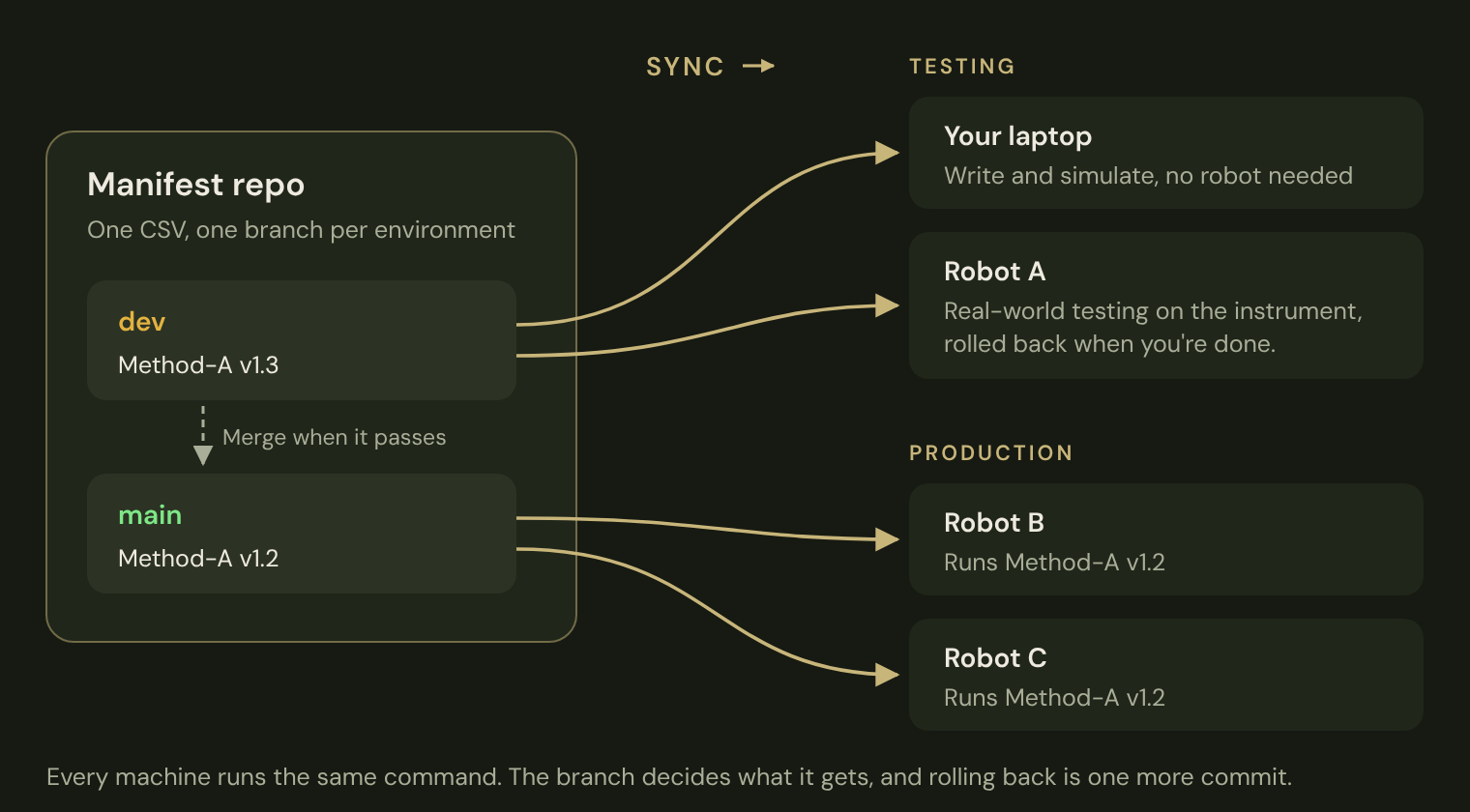
You can also roll a new version out gradually. Give the method one row per version and split the robots between them:
| Repo | Directory | Tag | Device1 | Device2 |
|---|---|---|---|---|
| Method-A | C:\Methods\Method-A | v1.2 | DEVICE_B | DEVICE_C |
| Method-A | C:\Methods\Method-A | v1.3 | DEVICE_A |
Robot A pilots v1.3 while B and C stay on v1.2. When you're happy with it, change one row and commit. And if something goes wrong after a rollout, rolling back is just another commit to the manifest.
Where it fits
repo-sync won't validate a method or stand in for your change control process. It also assumes your methods are already in version control, and for a lot of labs that's the bigger job: deciding how to structure repos, what to do with binary method files, and how to move a running fleet over without interrupting work already underway. That's a big part of what I do for clients, and repo-sync keeps things in order once it's done.
Why give it away
Honestly, because I'm tired of solving the same problem over and over. Every lab needed something like this, and each time it meant starting from a blank page. This time I wrote it from scratch, independently, so anyone can grab a tested, documented version and change it to fit their workflow.
repo-sync is the first of a few projects in the Tellurion pipeline, all built for the same reason: labs have much more important things to do than solve the same basic problems again and again. If you want to try it, the getting started guide walks through setup, and bug reports and feature requests are welcome as GitHub issues. And if the hard part is getting your methods into version control in the first place, that's exactly what I help labs with. Get in touch and we can talk through what your setup needs.
Hamilton, Hamilton Run Control and Hamilton Method Editor are trademarks of Hamilton Company. repo-sync is an independent project by Tellurion LLC and is not affiliated with or endorsed by Hamilton Company.